HFM
Multi-jurisdiction broker (formerly HotForex) with FCA, CySEC, and DFSA licences. Strong account-type breadth from Cent to Zero, with seven-figure account capability.
- Min deposit
- $5
- Max leverage
- 1:2000 (Cent) / 1:1000 (Premium)
- EUR/USD spread
- 1.2 pips
- Commission
- $0 on Premium / $3 on Zero
- Withdrawal time
- 1 day
- HQ
- Limassol, Cyprus / multi-entity
Regulation
Licences and oversight
| Regulator | Licence number |
|---|---|
| FCA United Kingdom | 801701 |
| CySEC Cyprus | 183/12 |
| DFSA Dubai | F004885 |
| FSCA South Africa | 46632 |
| FSC Mauritius | C110008214 |
| FSA Seychelles | SD015 |
Strengths
What works
- FCA UK licence — strongest single regulator on this catalogue alongside Exness.
- Cent account ($5 min) lets new EA users test live execution with minimal capital.
- Wide platform support: MT5, MT4, and proprietary mobile.
- PAMM account structure for users running EAs as managed accounts.
- Stock CFD breadth (1000+ instruments) — relevant for EAs with equity-index hedging.
Caveats
What to weigh
- Premium account spread (1.2 pips on EUR/USD) is mid-pack — scalpers should default to the Zero account.
- Commission structure differs by account type; total cost calculation is more involved than at single-account brokers.
- Withdrawal processing 1 business day is acceptable but slower than instant-withdrawal brokers (Exness, TitanFX).
Account & platform
How accounts and platforms break down
- Account types
-
- Cent
- Premium
- Pro
- Zero
- Auto
- PAMM
- Platforms
-
- MT5
- MT4
- HFM App
- Funding methods
-
- Bank wire
- Visa / Mastercard
- Skrill
- Neteller
- Crypto (BTC/USDT)
- Local payment methods
- Supported assets
-
- Forex (50+ pairs)
- Stock CFDs (1000+)
- Indices
- Commodities
- Metals
- Energies
- Crypto
Worth noting
Notable features
- HFcopy social trading platform (= optional, separate from EA execution).
- Educational programme depth (HFM Academy) — useful for users new to algorithmic trading.
- Multi-currency account base (USD, EUR, GBP, JPY, NGN, etc.).
Updated · How we test ↗
HFM rebranded from HotForex in 2022, but the operational infrastructure traces back to 2010 — making it one of the longest-running multi-jurisdiction brokers in the offshore segment. For an EA trader, that history is not trivia: a broker that has held a UK FCA licence for over a decade has had to survive the audit, reporting, and capital-adequacy cycles that quietly remove weaker operators. This profile is written for one reader — someone about to point an automated system at a live HFM account — and it focuses on the decisions the data tables above don’t make for you: which account type fits your EA, what your real cost per trade will be, and where HFM’s strengths and limits actually land. We rank brokers on EA-relevant data, not on what they pay us; see how we choose in our best MT5 brokers for EA trading guide.
Why HFM’s six regulators actually matter for an EA
It is easy to treat a list of licences as a logo wall. For an automated account it is closer to an insurance policy. HFM holds six licences, and two of them — the FCA (UK, 801701) and DFSA (Dubai, F004885) — carry obligations most offshore brokers never take on: segregated client funds, regular capital-adequacy reporting, and external audit. The reason this matters more for an EA than for a manual trader is exposure time. A discretionary trader closes their screen and walks away flat; an EA can hold positions, and your full balance, around the clock for weeks. The broker’s solvency and fund-segregation discipline is therefore continuously relevant, not just at the moment you click buy.
The practical read: HFM and Exness are the two brokers in this catalogue carrying a UK FCA licence, which makes HFM the strongest regulatory choice for a trader who wants oversight breadth behind a high-leverage offshore account. Negative balance protection is active on retail accounts, so a catastrophic gap can’t push you below zero — confirm it is live on your specific account type before you deploy a leveraged EA.
Match the account type to your EA
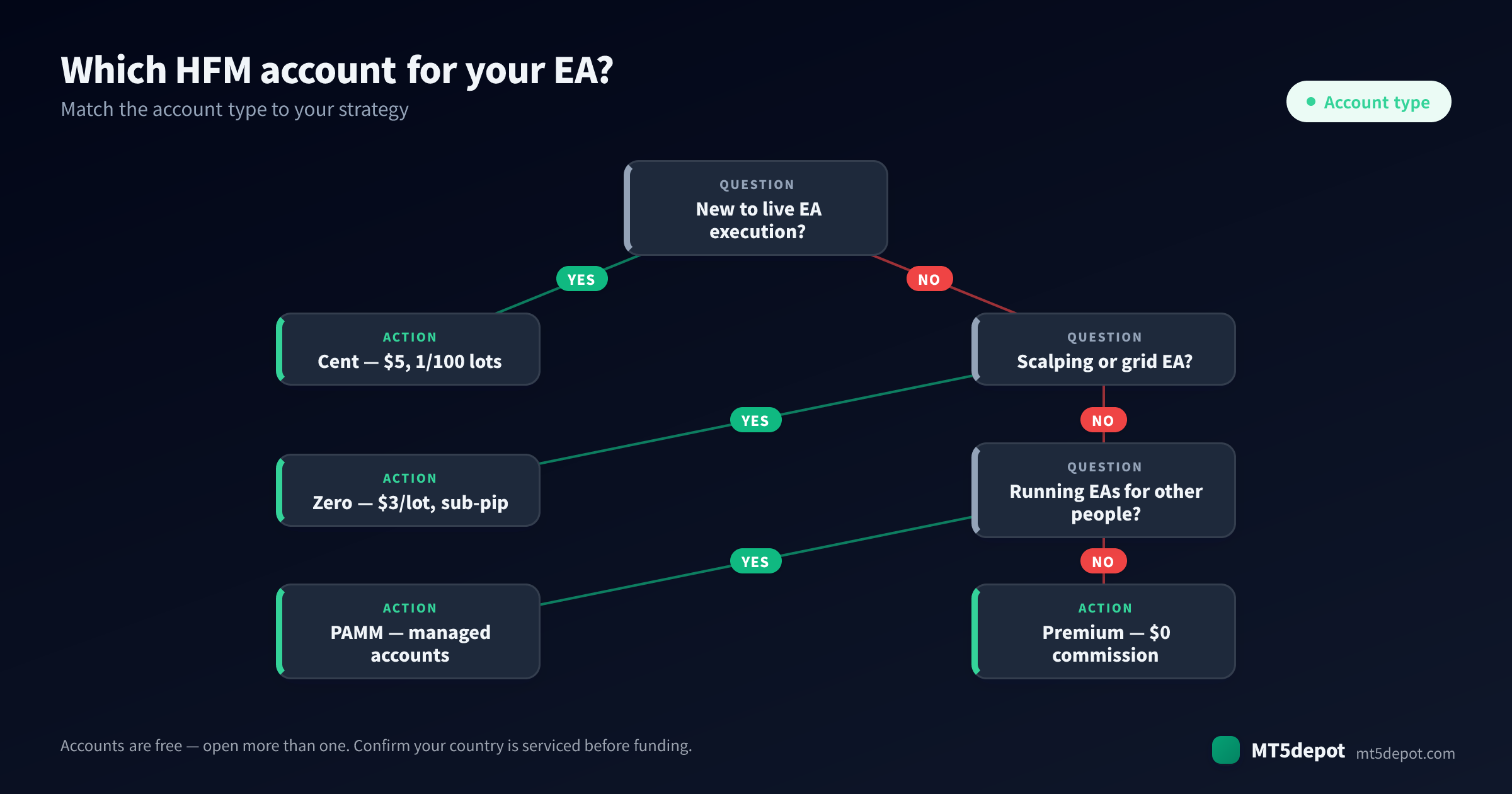
HFM’s account breadth is its defining feature, and choosing wrong is the most common way new users underperform an EA’s published numbers. The account decides your cost structure, and cost structure is the difference between profit and loss for anything that trades often. Use this picker, then read the account notes below it:
Cent — learn live execution for the price of a coffee
The Cent account ($5 minimum) sizes positions in 1/100 lots, which makes it the single best place in this catalogue to run a real EA on real market data with almost nothing at risk. The value is not the tiny stake itself — it is that live execution exposes the things a backtest never shows: how HFM names its symbols (a . suffix can stop an EA from trading), how the minimum lot interacts with your EA’s risk sizing, and how fills behave around the Friday close. Run a catalogued EA on Cent for a full week, including a weekend, before you scale. The getting started guide walks that demo-week routine end to end.
Zero — the cost-efficient home for scalpers and grids
The Zero account ($3/lot commission, sub-pip spreads on majors) is the right default for any high-frequency strategy — scalping, grids, and anything trading more than ~50 positions a month. The reason is total cost: a tight raw spread plus a transparent fixed commission is cheaper and more predictable than a wider all-in spread once trade frequency climbs. If your EA’s edge is measured in fractions of a pip, the Zero account is not optional.
Premium — commission-free for swing and trend systems
The Premium account charges no commission and carries a 1.2-pip typical spread on EUR/USD. For low-frequency trend and swing EAs that trade a few times a week and target large moves, the spread is a rounding error against the move size, and the zero-commission simplicity is genuinely easier to reason about. Do not use Premium for a scalper — the 1.2-pip spread is mid-pack and will erode a fast system’s edge.
Pro, Auto, and PAMM — managed and automated structures
The Pro account suits experienced users who want raw conditions without the Cent learning wheels. PAMM is the one to note if you intend to run EAs for other people: it is a managed-account structure that lets an operator allocate a single EA’s trades across multiple investor accounts, which — combined with the HFcopy social-trading platform — makes HFM a viable base for running automation as a service rather than just for your own capital.
Spreads and total cost: how to actually compare Premium vs Zero
This is the calculation most traders skip, and it decides which HFM account is cheaper for your EA. Total cost per round-turn is spread (in account currency) + commission — never spread alone.
- Premium: ~1.2 pips spread, $0 commission. On a standard lot that is roughly $12 per round-turn, all in.
- Zero: sub-pip raw spread (call it ~0.2 pips, ≈ $2) plus $3/lot commission ≈ $5 per round-turn.
For a swing EA taking 10 trades a month, the difference (~$70/month) is immaterial against the size of the moves it targets — Premium’s simplicity wins. For a scalper taking 200 trades a month, the same per-trade gap compounds to roughly $1,400/month, which can be the entire edge. Run the maths on your EA’s documented trade frequency before you pick, and remember the published backtest figures in the EA catalogue are measured on Exness retail-spread tick data — each EA profile documents how its spread compatibility holds up across the participating brokers, so treat them as a costed hypothesis your Cent-account demo week confirms.
What STP execution means when your EA fires an order
HFM runs an STP (straight-through processing) model: your orders are passed to liquidity providers rather than filled against an in-house dealing desk. For an EA, the property that matters is that market orders fill at the available price without the requote loop a pure market-maker can apply at candle close. The trade-off versus a true ECN broker like TitanFX is latency: STP routing is a notch slower than NY4-colocated ECN, which matters for sub-second scalpers but is invisible to the vast majority of EAs trading on M5 and higher timeframes. For most of mt5depot’s catalogue, HFM’s STP execution is more than adequate; only a latency-critical high-frequency strategy should prefer a pure-ECN venue.
Platforms: MT5, MT4, and why it still matters
HFM supports MT5, MT4, and its own HFM App. The MT4 support is the quiet differentiator: a large number of older EAs are compiled as .ex4 for MetaTrader 4 only and cannot run on MT5. If your EA is a legacy MT4 system, HFM lets you run it without switching brokers — not every broker in this catalogue offers that. For MT5-native EAs, you get the modern terminal with its better strategy tester and native economic calendar. The mobile app monitors positions but, like every mobile terminal, cannot run an EA — automation needs the desktop terminal, ideally on a VPS.
Funding and withdrawals on an active EA account
HFM processes withdrawals in 1 business day across bank wire, cards, e-wallets, crypto (BTC/USDT), and local payment methods, with a multi-currency account base (USD, EUR, GBP, JPY, NGN, and more). One business day is reliable and entirely workable, but it is slower than the instant or same-day rails at Exness and TitanFX — a difference that only matters if you actively cycle profits out of a high-frequency account week to week. For most EA traders compounding inside the account, it is a non-issue.
Is HFM the right broker for your EA?
HFM is the safest first broker for a new EA user, and the case is specific: the FCA-led six-regulator footprint gives you maximum oversight, the $5 Cent account lets you learn live execution at near-zero risk, and the Zero account gives you a cost-efficient home to scale into once a strategy proves out. Add MT4 support for legacy systems and PAMM for managed automation, and HFM covers more of the EA lifecycle than any single-account broker here.
Where it is not the first pick: a pure latency-sensitive scalper will get faster fills from TitanFX’s ECN, and a trader who cycles profits out weekly will prefer instant-withdrawal Exness. HFM’s own caveats are honest and worth weighing — the Premium spread is mid-pack, and the per-account commission structure means you must calculate total cost rather than assume it. For a beginner-to-intermediate EA trader who values regulation and a low-risk on-ramp, none of that outweighs the strengths.
How HFM compares to the rest of the catalogue
Briefly, against the other catalogued brokers: HFM matches Exness on FCA-grade regulation but trails it on raw spread (1.2 vs 0.7 pips) and withdrawal speed; it offers broader oversight than single-regulator TitanFX while conceding pure-ECN latency; and it beats newer, narrower brokers like FXGT and Axiory on regulatory breadth and track record. The full side-by-side is in our best MT5 brokers for EA trading comparison, and the criteria behind these judgements are set out in how to choose a broker for EAs.
Opening an HFM account for EA trading, step by step
- Open the account through the link on this page. Using our IB link costs you nothing extra and is how mt5depot funds this catalogue (see the transparency note below).
- Choose your account type by strategy — Cent to learn, Zero for scalp/grid, Premium for swing/trend. You can open more than one.
- Download the MT5 (or MT4) desktop terminal from HFM after registration. The mobile app cannot run EAs.
- Fund the documented minimum for your EA, not your full bankroll, and run a one-week demo or Cent-account trial first.
- Set up a VPS before going live so the EA runs 24/7 next to the broker’s servers rather than on a home machine that can sleep or disconnect.
The Cent-account learn-live workflow, step by step
HFM’s $5 Cent account is the single most useful on-ramp in this catalogue, but most new users waste it by treating it as a formality rather than a structured rehearsal. Because positions are sized in 1/100 lots, you can run a catalogued EA on genuine live execution while risking the cost of a coffee — which means the Cent account is where you discover the operational facts a backtest can never surface. Used deliberately, it is a four-stage routine, not a single deposit.
Stage one — demo first, Cent second. Run the EA on an HFM demo account for two or three days purely to confirm it attaches, reads its inputs, and places orders without errors. A demo is free and catches configuration mistakes before any money is involved. Only once the EA trades cleanly on demo do you fund the Cent account.
Stage two — verify symbol names and minimum lots. This is the step that quietly breaks more EAs than any other. HFM names its symbols its own way, and an EA hard-coded for a different broker’s symbol string will silently fail to trade. On the Cent account, confirm the EA recognises the exact symbol, and check how the broker’s minimum lot interacts with your EA’s risk-based position sizing — a system that wants to trade smaller than the minimum will behave differently live than in a backtest.
Stage three — survive a weekend. Leave the EA running on Cent across a full week including the Friday close and weekend gap. How fills behave around the close, whether the EA reopens correctly on Monday, and how it handles the wider weekend spread are all things you want to learn on 1/100 lots, not on a funded Premium account.
Stage four — scale only what proved out. If the EA traded for a week on Cent with behaviour that matched its documented profile, you move it to a Zero or Premium account sized to your real risk budget. If it didn’t, you have lost almost nothing and learned everything. The getting started guide walks the same demo-then-live discipline in more general terms; HFM simply makes the live half of it cheaper than anywhere else here.
A useful discipline through all four stages is to keep a one-line log of every surprise — a symbol that didn’t resolve, a fill that slipped at the close, a minimum-lot rounding you didn’t expect. By the time you scale, that log is your real broker-specific operating manual, worth more than any backtest report because it describes how your EA behaves on HFM’s live plumbing rather than on a vendor’s idealised history.
How mt5depot earns money
A money page should say plainly how it is funded, so: when you open an HFM account through the IB link on this page, mt5depot earns an introducing-broker (IB) commission from HFM on your trading activity. It costs you nothing extra — your spread and commission are identical to opening directly, and there is no markup added on our side. HFM is a backup partner in our mix rather than a primary one, which means our incentive here is narrow: we list it because its regulation breadth and Cent account genuinely fit a specific reader, not because it is where we steer volume.
What that commission does not buy is HFM’s placement in our analysis. It earns its spot on the FCA-led six-regulator footprint and the $5 Cent on-ramp, both of which sit in HFM’s own published terms — not on what it pays us. Exact IB commission terms are commercial and may change, so we describe the relationship rather than quote a rate; confirm any figure that matters to you with HFM directly. Our incentive is to send you to a broker you stay with because it suits your EA, since an account you abandon in a month is worth nothing to either of us, and a mismatched recommendation costs us the trust this whole catalogue runs on.
Who can open an HFM account — country and region restrictions
HFM accepts offshore clients across most regions, but by regulation it does not accept clients in the United States, Canada, the EEA (retail), Japan, Iran, or the DPRK. EEA retail traders and the other restricted jurisdictions are declined or routed elsewhere — expected behaviour, and the offshore entity documented here is intended for non-EU English-speaking traders. Confirm your country is serviced before you fund, because an EA can only ever compound the capital you were actually able to deposit.
Which of HFM’s six entities you are onboarded under depends on your country, and the entity determines your leverage ceiling and the exact obligations behind your account. Wherever you land, retail accounts still carry segregated client money and negative balance protection. If you are unsure which entity applies to you, begin the registration flow and confirm the servicing entity and your available leverage on screen before transferring any funds — a thirty-second check that prevents a misdirected deposit.
Risks and what to confirm before you fund
Leverage up to 1:2000 on the Cent account is a tool, not a target — size your risk as if it were capped, because an EA that over-positions on high leverage fails by drawdown. Before deploying, confirm three things on your specific account: that negative balance protection is active, that your country is serviced (the restricted regions are listed under who can open an account above), and that your EA’s permitted strategies — hedging and grid are allowed — match how it trades. The detailed testing process behind every figure we publish is on our methodology page.
FAQ
Is HFM good for EA / automated trading? Yes. HFM allows EAs on MT5 and MT4, supports hedging and grid strategies, and its Cent and Zero accounts cover the two most common EA needs — learning live execution cheaply and trading high-frequency strategies at low cost. STP execution is well-suited to EAs on M5 and higher timeframes.
Which HFM account is best for an EA? Cent ($5) to learn live execution at near-zero risk, Zero ($3/lot, sub-pip) for scalping and grids, and Premium (commission-free) for low-frequency swing and trend systems. Match the account to your EA’s trade frequency.
Can I run an MT4 EA on HFM?
Yes — HFM supports both MT4 and MT5, so legacy .ex4 EAs that cannot run on MT5 will work. This is a genuine advantage over MT5-only brokers in this catalogue.
Is HFM regulated and safe? HFM holds six licences including the UK FCA (801701) and DFSA Dubai (F004885), with segregated client funds and negative balance protection on retail accounts. It is among the most heavily regulated brokers in this catalogue.
Does HFM offer a free VPS? HFM’s standout EA perks are regulation and the Cent account rather than a bundled VPS — for free hosting, XM is the catalogue option (free VPS above $5,000 balance). A VPS is mandatory for live EA trading regardless of broker; see our VPS guide.
Next steps
If HFM fits your EA, open the account by strategy — Cent to learn, Zero to scale — and start with a demo or Cent-account week before funding live. From there, browse the EA catalogue for a system matched to your risk tolerance, set up a VPS, and compare HFM against the full field in the best MT5 brokers for EA trading guide. The traders who last are the ones who verified on a small account first.
EA compatibility
30 EAs verified on HFM
| EA | Strategy | Pair | Typical spread | Min lot | |
|---|---|---|---|---|---|
| Almanac | Composite | USD/JPY | — | — | View → |
| Antipode | Mean Reversion | EUR/AUD | — | — | View → |
| Ballast | Mean Reversion | EUR/GBP | — | — | View → |
| Beacon | Mean Reversion | AUD/CAD | — | — | View → |
| Cairn | Composite | EUR/USD | — | — | View → |
| Chronograph | Composite | CHFJPY_DUKA | — | — | View → |
| Chrysalis | Mean Reversion | GBP/JPY | — | — | View → |
| Cloudbank | Trend | USD/JPY | — | — | View → |
| Gyre | Mean Reversion | AUD/CAD | — | — | View → |
| Iridescence | Composite | EUR/USD | — | — | View → |
| Lanternfish | Mean Reversion | USD/JPY | — | — | View → |
| Lattice Weave | Mean Reversion | GBP/AUD | — | — | View → |
| Metronome | Mean Reversion | JP225 | — | — | View → |
| Murmuration | Composite | AUD/USD | — | — | View → |
| Nautical | Composite | EUR/JPY | — | — | View → |
| Orrery | Trend | JP225 | — | — | View → |
| Peregrine | Trend | BTCUSD | — | — | View → |
| Ricochet | Mean Reversion | EUR/USD | — | — | View → |
| Saltpan | Composite | USD/JPY | — | — | View → |
| Serac | Mean Reversion | NZD/USD | — | — | View → |
| Stillwater | Composite | USD/JPY | — | — | View → |
| Sundial | Trend | EUR/JPY | — | — | View → |
| Tessera | Trend | USD/JPY | — | — | View → |
| Thunderhead | Composite | EUR/GBP | — | — | View → |
| Tolling | Composite | GBPJPY_DUKA | — | — | View → |
| Tradewind | Composite | USD/JPY | — | — | View → |
| Windrose | Mean Reversion | AUD/CAD | — | — | View → |
| Zerqon | Trend | US30 | — | — | View → |
| Kestrel Hover | Trend | USD/JPY | — | — | View → |
| Tidewell Slack | Mean Reversion | GBP/JPY | — | — | View → |
Eligibility
Restricted jurisdictions
HFM does not accept clients resident in the following jurisdictions. mt5depot reflects this restriction on its IB referral.
- United States
- Canada
- EEA retail
- Japan
- Iran
- DPRK
Risk disclosure
Trading leveraged forex and CFDs carries a high level of risk and may not be suitable for all investors. The high degree of leverage offered by HFM can work against you as well as for you. Before deciding to trade through HFM you should carefully consider your investment objectives, level of experience, and risk appetite, and seek independent financial advice if necessary.
mt5depot does not give investment advice and does not represent HFM. The IB referral on this page generates a commission for mt5depot when you open an account and trade. Spreads, fees, and execution are determined by HFM and not by mt5depot.